Content management
Manage your pages, articles and media in one place. Build your brand story alongside your product catalogue.

Start Your Own E-commerce Shop.
Get WordPress, WooCommerce and Elementor Free prepared for you, with cPanel hosting, professional email, SSL and daily backups. You customise and run your shop.
 WordPress
Prepared
WordPress
Prepared WooCommerce
Included
WordPress
WooCommerce
WooCommerce
Included
WordPress
WooCommerce Elementor Free
We prepare the technical starting point.
You build and operate your shop.
You choose, configure and test the integration.
 — integration information, opens in a new tab
 — integration information, opens in a new tab
 — integration information, opens in a new tab
 — integration information, opens in a new tab
 — integration information, opens in a new tab
 — integration information, opens in a new tab
Check current WooCommerce compatibility. Provider accounts, approval and transaction fees are separate from your hosting.
From your domain to an e-commerce shop starting point.
We prepare the e-commerce shop environment. You customise the shop, add products, connect payments and operate the business.
Elementor Free is included with SELL / E-COMMERCE.
Design ordinary website pages with a visual editor. WooCommerce supplies your product catalogue, cart, checkout and order tools.
Elementor Pro and its WooCommerce template builder are not included. Paid themes, plugins and third-party services are separate.
We prepare the shop environment.
You build and operate the shop.
Build the pages around your shop visually: a welcoming homepage, your brand story and campaign landing pages. WooCommerce provides the shopping tools.
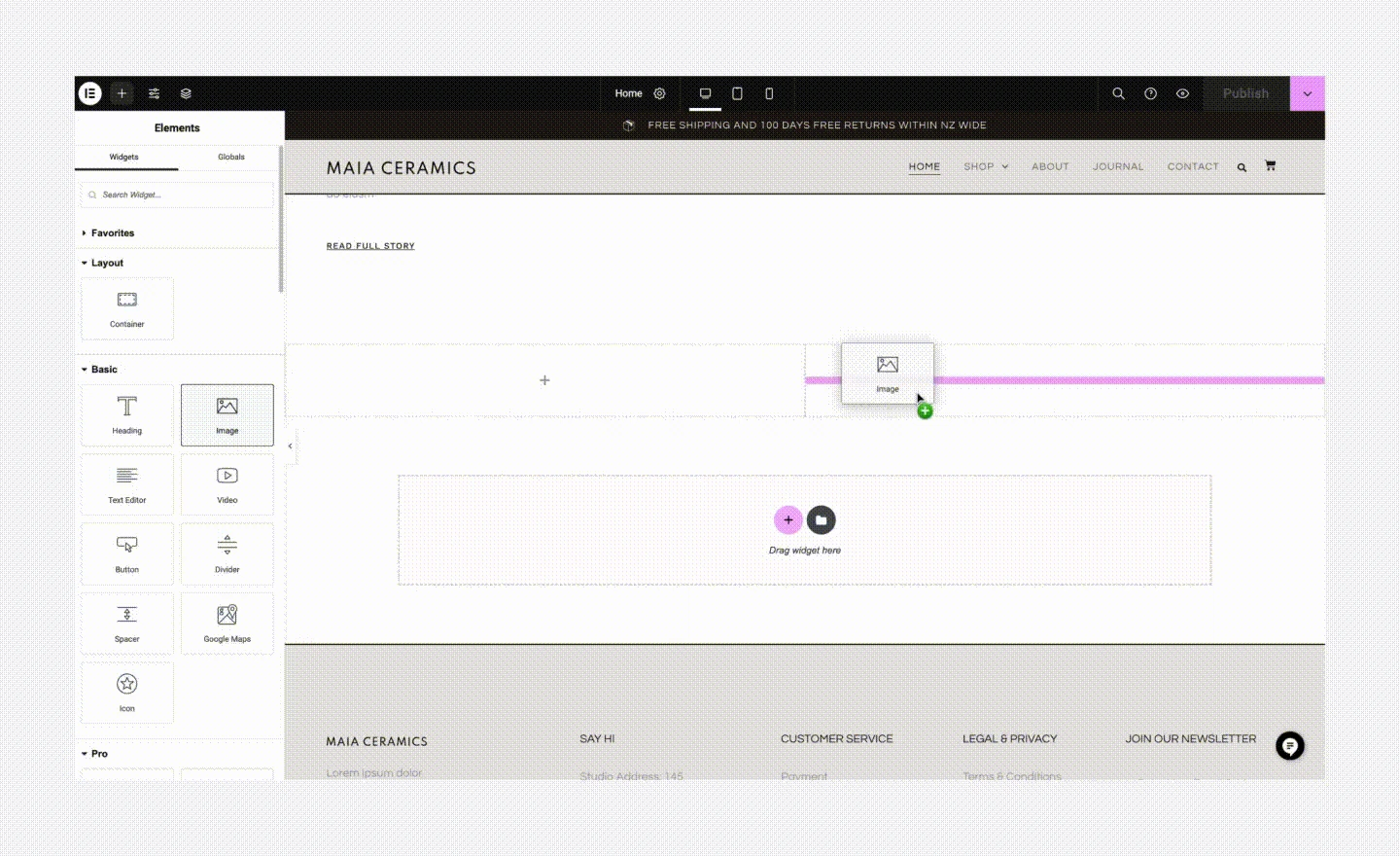
Pick the Image widget from the panel and drag it to the highlighted position on the page.
Publisher’s guide — opens in a new tab ↗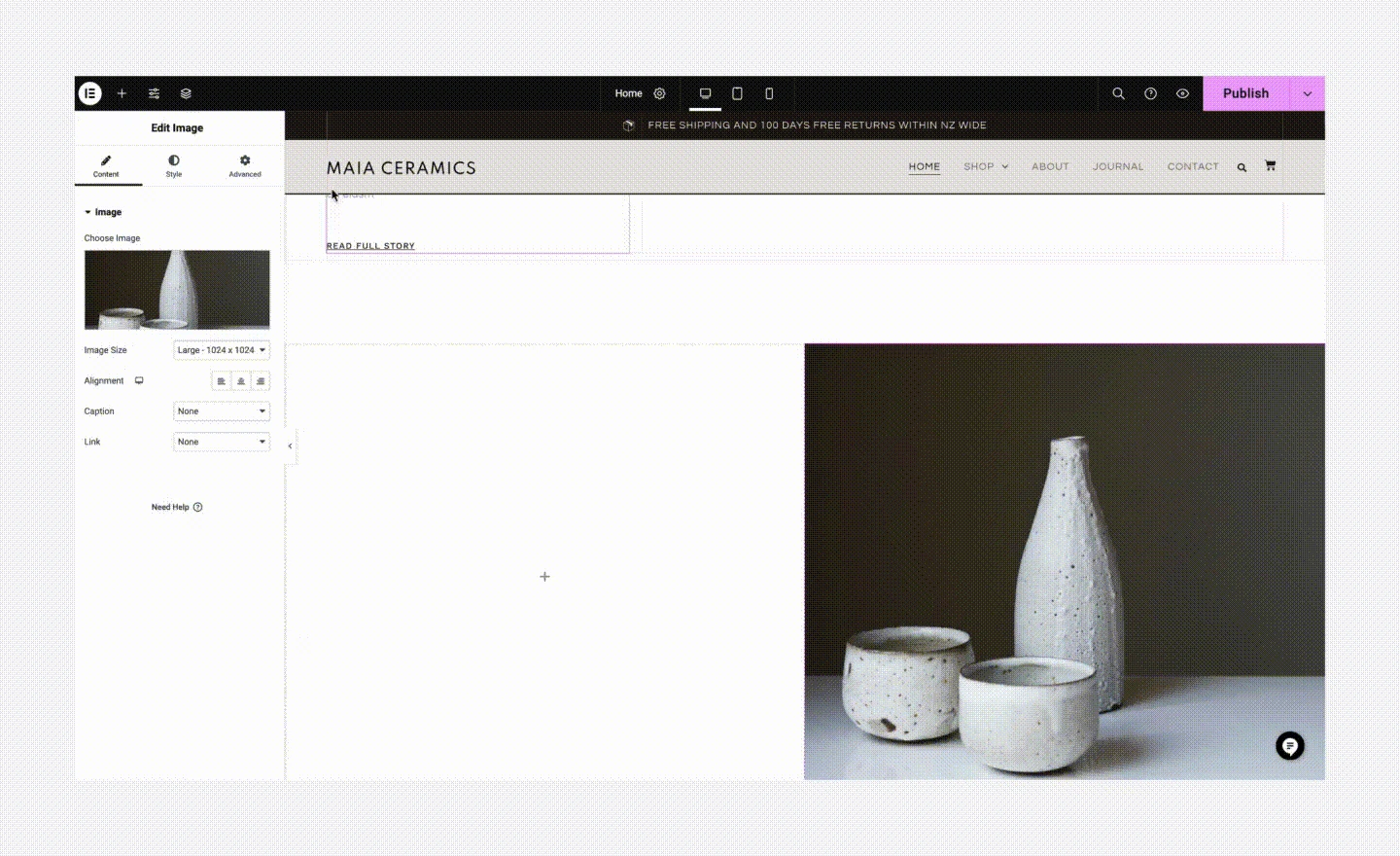
The image appears in the layout. Use the settings panel to choose the picture and adjust its presentation.
Publisher’s guide — opens in a new tab ↗Actual publisher screenshots. Editor versions and available tools may differ; the Elementor examples demonstrate the Image widget available in Elementor Free.
Open a page in Elementor and begin with a blank layout or an available free template.
Add headings, text, images and buttons. Arrange the page visually instead of writing page code.
Change colours, fonts and spacing. Use your own photos and clear wording to make the page feel like your business.
Check the desktop, tablet and phone views. Refine the layout and publish when you are happy with it.
Create your homepage, About page and promotional landing pages with headings, pictures, text and buttons.
Manage products, stock, cart, checkout and orders. Your theme and WooCommerce settings control the shop layouts.
Elementor Free is included with SELL / E-COMMERCE. Its visual page editor does not include Elementor Pro’s WooCommerce template builder. Advanced shop-template editing may need a separate paid tool.
Start your shop — R149/month
WordPress gives your business a website and content hub. WooCommerce adds the catalogue, checkout and day-to-day shop tools. Choose the integrations that suit the way you sell in South Africa.
Manage your pages, articles and media in one place. Build your brand story alongside your product catalogue.
Add product descriptions, photos, prices and variations. Track inventory, manage orders and create coupon offers.
Review sales, orders and product performance in Analytics. Filter your reports and export data to help plan your next move.
Connect a compatible gateway such as Payfast, Yoco or Peach Payments. Your provider account, approval and transaction fees are separate.
A compatible courier integration, such as The Courier Guy, can quote delivery at checkout using parcel details and destination. Configure the plugin and your courier account.
Use a suitable invoicing extension to create PDF invoices and packing documents. Configure your business details and document settings; extension costs may apply.
SELL / E-COMMERCE prepares your starting point for R149/month.
You add products, configure payments and shipping, test checkout and operate the shop. Courier charges, provider fees and optional paid extensions are separate.
Real software screens show how you manage the business after a customer places an order. Select a screenshot to see the details.
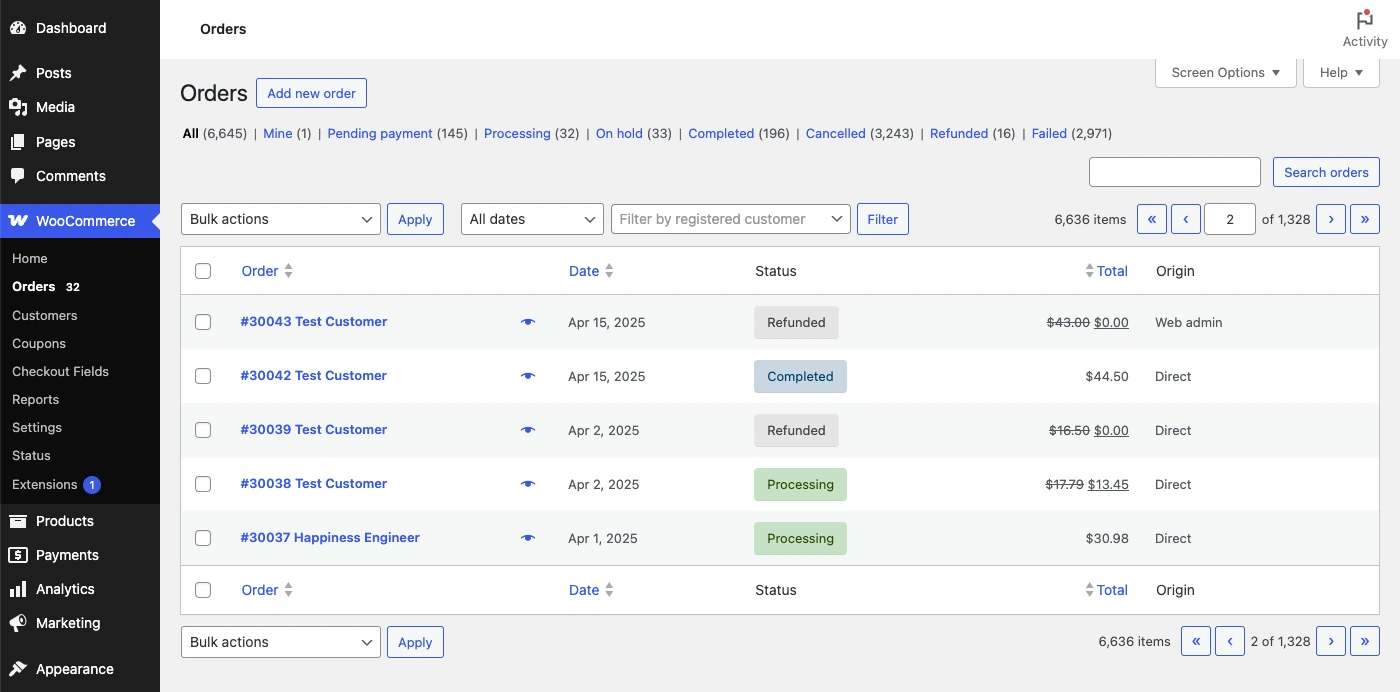
See orders, dates, totals and fulfilment status in WooCommerce. Search and filter to find the order you need.
Publisher’s guide — opens in a new tab ↗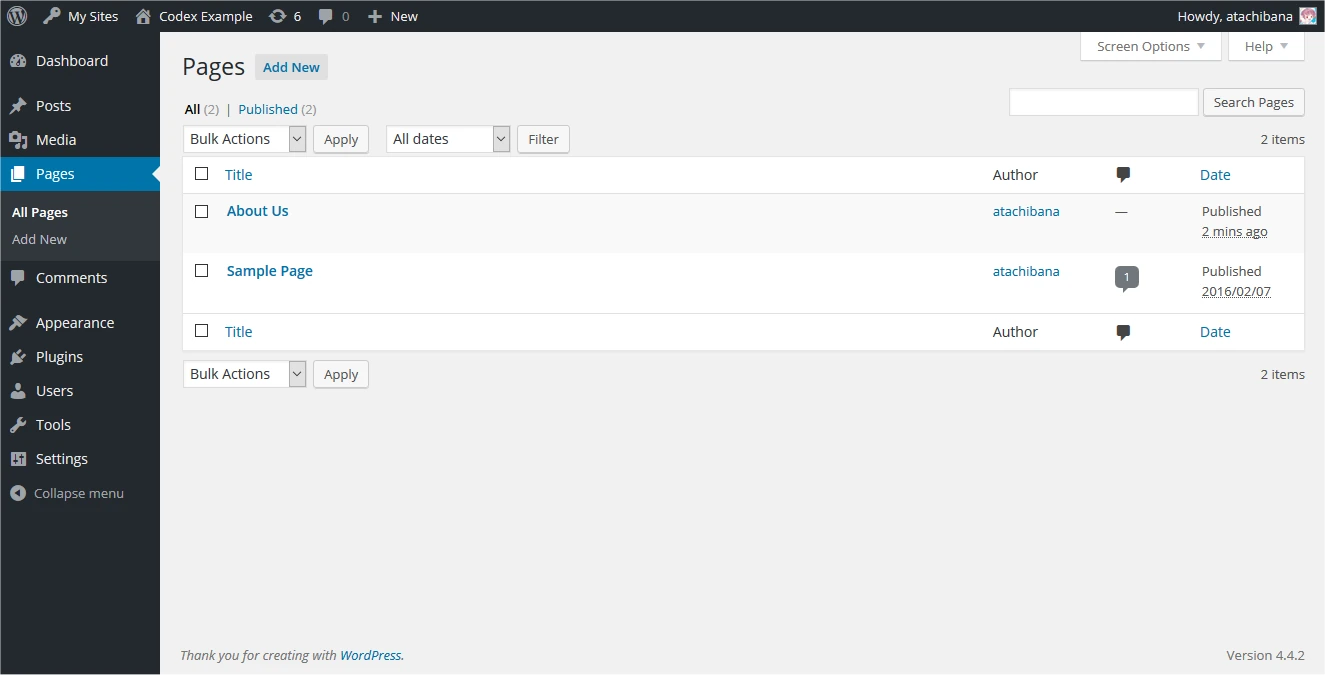
The WordPress Pages screen is your content management system (CMS): organise pages, edit content and manage publishing.
Publisher’s guide — opens in a new tab ↗
Review customer records, order counts and spending in the WooCommerce Customers report.
Publisher’s guide — opens in a new tab ↗
Review payment status alongside billing and delivery details. Gateway confirmations update order status; payouts and settlement are managed with your chosen South African provider.
Publisher’s guide — opens in a new tab ↗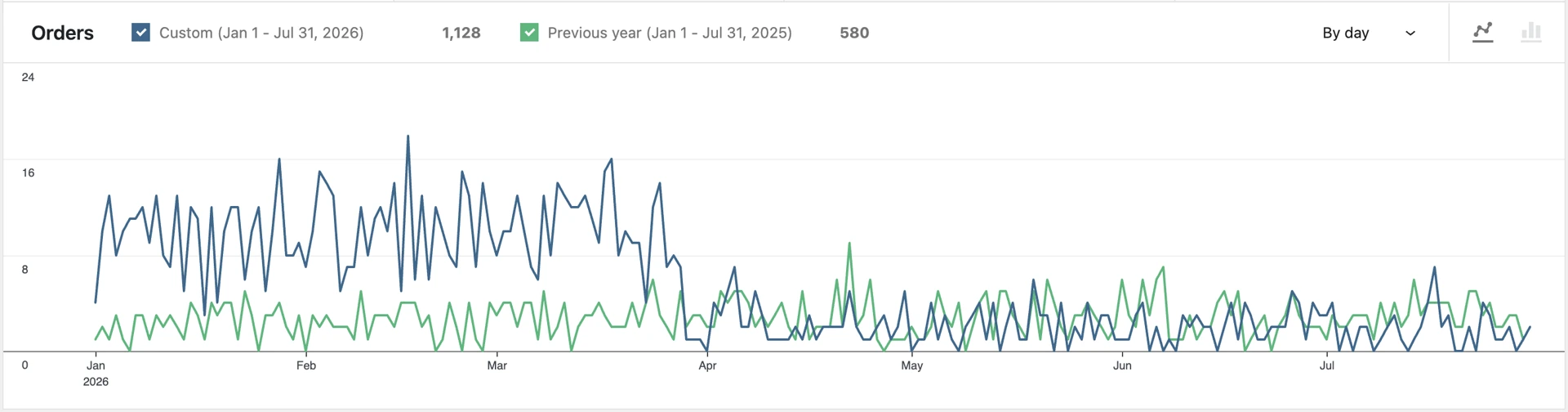
Use WooCommerce Analytics to compare sales and orders over time and plan your next steps.
Publisher’s guide — opens in a new tab ↗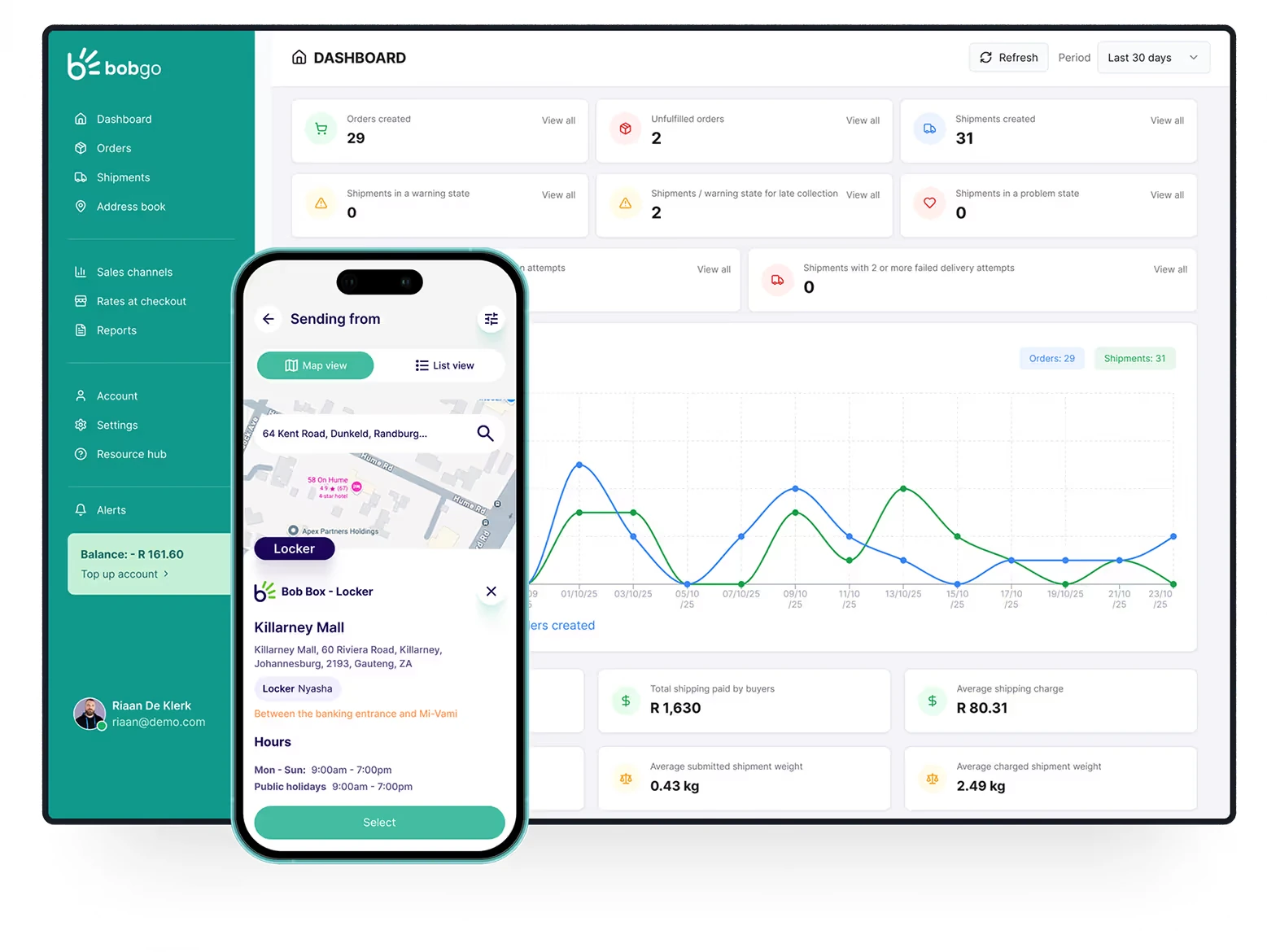
Bob Go connects to WooCommerce and shows shipment activity and delivery exceptions. Its dashboard is a separate service, with its own account and charges.
Publisher’s guide — opens in a new tab ↗Publisher demonstration data, currencies and example businesses are shown. These are not WH4SA customer records or sales results. Screen appearance depends on the software version and integrations you choose.
Give customers familiar payment choices and delivery options that suit their address, schedule and budget. Connect your preferred services to WooCommerce.
— integration information, opens in a new tab
— integration information, opens in a new tab
— integration information, opens in a new tab
— integration information, opens in a new tab
— integration information, opens in a new tab
— integration information, opens in a new tab iKhokha — provider information, opens in a new tab ↗
iK Pay Gateway for WooCommerce
iKhokha — provider information, opens in a new tab ↗
iK Pay Gateway for WooCommerce Netcash — provider information, opens in a new tab ↗
Pay Now integration
Netcash — provider information, opens in a new tab ↗
Pay Now integration Stitch — provider information, opens in a new tab ↗
Stitch Express for WooCommerce
Stitch — provider information, opens in a new tab ↗
Stitch Express for WooCommerce Payflex — provider information, opens in a new tab ↗
Pay-now and pay-later options
Payflex — provider information, opens in a new tab ↗
Pay-now and pay-later options PayJustNow — provider information, opens in a new tab ↗
Buy-now-pay-later integration
PayJustNow — provider information, opens in a new tab ↗
Buy-now-pay-later integration SnapScan — provider information, opens in a new tab ↗
Online payments with its WooCommerce gateway
SnapScan — provider information, opens in a new tab ↗
Online payments with its WooCommerce gateway Zapper — provider information, opens in a new tab ↗
Online payment integration
Zapper — provider information, opens in a new tab ↗
Online payment integration PayU — provider information, opens in a new tab ↗
PayU MEA connector — confirm current South African merchant support
PayU — provider information, opens in a new tab ↗
PayU MEA connector — confirm current South African merchant support Bob Pay — provider information, opens in a new tab ↗
South African online payments with a WooCommerce integration
Bob Pay — provider information, opens in a new tab ↗
South African online payments with a WooCommerce integration PayGenius — provider information, opens in a new tab ↗
Hosted payment checkout for WooCommerce
PayGenius — provider information, opens in a new tab ↗
Hosted payment checkout for WooCommerce Adumo Online — provider information, opens in a new tab ↗
WooCommerce payment integration
Adumo Online — provider information, opens in a new tab ↗
WooCommerce payment integration iVeri — provider information, opens in a new tab ↗
iVeri Lite WooCommerce gateway
iVeri — provider information, opens in a new tab ↗
iVeri Lite WooCommerce gatewayChoose the providers and payment methods that fit your business. A merchant account, provider approval, compatible integration and configuration are required. Transaction fees and any service charges are separate from hosting.
The Courier Guy offers a WooCommerce shipping plugin. Aramex South Africa also supports e-commerce integrations. Configure collection details, parcel sizes, service areas and rates with your provider.
Offer a locker collection choice with pudo / The Courier Guy Lockers. Arrange your account and supported shop integration with the provider, then configure eligible lockers and parcel sizes.
Pargo, PAXI, Bob Box and PostNet are other pickup options to consider. Booking and checkout integration depend on the service you choose.
 RAM — provider information, opens in a new tab ↗
 Fastway — provider information, opens in a new tab ↗
 SkyNet — provider information, opens in a new tab ↗
 Internet Express — provider information, opens in a new tab ↗
 DPD Laser — provider information, opens in a new tab ↗
 DSV — provider information, opens in a new tab ↗
 CourierIT — provider information, opens in a new tab ↗
 City Logistics — provider information, opens in a new tab ↗
 Citi-Sprint — provider information, opens in a new tab ↗
 MTE Xpress — provider information, opens in a new tab ↗
 WumDrop — provider information, opens in a new tab ↗
 PostNet — provider information, opens in a new tab ↗
A shipping platform such as Bob Go connects WooCommerce to its supported courier partners for quotes, waybills and tracking. Other carriers may need a direct account, a compatible connector or separate bookings.
Carrier coverage, collection points, rates and integration support vary. Confirm your selected service before enabling it at checkout. Provider accounts, courier charges and optional software subscriptions are separate; SELL / E-COMMERCE does not include these services.
Choose your package based on how much starting-point assistance you need.
I know how to install and configure WordPress myself.
I want WH4SA to prepare WordPress and Elementor Free.
I want a prepared WordPress and WooCommerce shop environment.
We’d rather help you choose the right package than sell you something you don’t need.
Understand what each part of your hosting package does.
WordPressPages, posts and website content.
WooCommerceProducts, orders and shopping cart.
Elementor FreeVisual page building. Drag, drop and edit.
Domains, email, files and databases.
SELL / E-COMMERCE is a DIY hosting product. You create and manage your website or shop.
A prepared environment is the first step. Make the following checks before inviting customers to buy.
Choose an appropriate theme, add your branding and create your key pages. Use the tools available in Elementor Free and WooCommerce.
Add clear descriptions, photographs, accurate prices and stock details. Set your shipping areas and delivery charges.
Apply for your chosen gateway, install its supported integration and configure it. Test product selection, checkout, payment confirmation and order emails.
Publish your shop when it is ready. Manage orders, customers and stock, and keep software and business information up to date.
Find a product → add to cart → choose delivery → pay → receive confirmation.
Test each stage yourself, including declined payments and order notifications. The shop is ready to trade only when your payment, delivery and operational arrangements are in place.
BUILD prepares a standard WordPress website. SELL / E-COMMERCE adds the WooCommerce starting point for online selling.
WooCommerce adds e-commerce shop features to WordPress. SELL / E-COMMERCE prepares the environment; your catalogue and business decisions make it a shop.
Add product names, photographs, prices and stock information. Organise your catalogue so customers can find what they need.
Use WordPress for your content and Elementor Free for supported page layouts. Your theme and WooCommerce control the shop’s specialist layouts.
WordPress HostingWooCommerce provides a cart and checkout journey. You configure payments and test purchases before opening your shop.
Manage incoming orders and customer details. You fulfil orders, handle service enquiries and keep business records.
Connect your shop’s domain and create business email addresses to support customer conversations.
Email HostingcPanel, SSL certificates and daily backups are included. Maintain your shop software and independent recovery copies.
cPanel HostingGot questions? We’ve got answers.
BUILD prepares WordPress and Elementor Free for a standard website. SELL / E-COMMERCE adds WooCommerce preparation for an e-commerce shop environment. You customise and operate the shop in both cases.
No. WH4SA prepares the hosting and software starting point. You create the shop design, product catalogue, photographs, pricing, delivery arrangements and business policies.
No. Payment-gateway accounts, approval and transaction charges are separate from WH4SA hosting. Check the provider’s current requirements and charges before connecting it.
Elementor Free supports visual page building within the free edition’s features. Specialist shop, product and checkout layouts depend on your theme, WooCommerce and any separately chosen extensions.
You arrange delivery, configure shipping choices, fulfil orders and respond to customers. The hosting package provides the environment for your shop.
Contact us before moving so we can discuss the database, product images, current orders, email and payment integrations. Migration scope and any charges are confirmed separately.
WordPress, WooCommerce and Elementor Free prepared for you. You build and run your shop.