
The phrase “cPanel vs WordPress hosting” can make two complementary tools sound like competing choices. cPanel helps manage a hosting account. WordPress is software for creating and maintaining a website. A WordPress site can run inside a cPanel hosting account, so it is entirely normal to use both.
The useful question is what you want prepared for you, what you prefer to configure yourself, and how you will manage the finished website. This guide separates those decisions and explains the difference between WH4SA's HOST and BUILD starting points without treating one as a compulsory upgrade for every customer.
cPanel manages the hosting environment
cPanel is a control panel for account-level tasks such as managing website files, domains, databases and email accounts. It can also expose SSL, backup and resource tools, depending on the hosting configuration. The exact interface and enabled features can vary, so use your provider's guidance when locating an unfamiliar setting.
You might open cPanel to create a mailbox, inspect a file, manage a database user or check account storage. These tasks support a website, but they are not the same as writing a service page or arranging its photographs. Editing a WordPress page usually happens in WordPress rather than cPanel's file manager.
The cPanel hosting page describes the WH4SA environment. For a fuller tour of the concepts, read what cPanel does. Keeping account management separate from page editing helps you avoid changing server-level settings to solve an ordinary content problem.

For a .co.za WordPress website, these tools perform complementary jobs. They are not mutually exclusive technologies.
WordPress manages website content
WordPress provides a dashboard for pages, posts, media, themes, plugins and users. A theme controls much of the site's presentation, while plugins add specific features. Elementor Free is one possible visual page-editing tool within that WordPress environment. WordPress remains responsible for its own content and settings even when hosting is managed through cPanel.
For example, a guesthouse owner might use WordPress to change room descriptions and publish local travel articles, then use cPanel to manage the business email account. The same person can hold both sets of access, but a staff member who only edits articles may need WordPress access alone.
WordPress is flexible because its ecosystem offers many approaches. That also means someone must choose compatible components and maintain them. Installing more plugins is not automatically an improvement. Start with the features your visitors need and add software deliberately, checking its support, update history and licensing requirements.
HOST and BUILD differ in the starting point
WH4SA HOST costs R79/month and provides general cPanel hosting. It suits customers who want to choose and set up their own tools, or use the SiteJet website-builder pathway. WordPress is not reserved exclusively for BUILD: a customer with the appropriate skills can install and configure it on suitable HOST hosting.
BUILD costs R99/month and prepares WordPress and Elementor Free as the customer's starting environment. This reduces the initial software setup work, but it does not supply a completed business website. The customer still chooses the design, creates content, configures features and manages the site after launch.
Both are hosting pathways. BUILD should not be interpreted as a promise that WH4SA will design the site, write its pages or maintain every plugin. If a task is outside your experience, clarify what guidance is available and whether you need a separate website professional to undertake that work.
Scroll sideways to see all columns.
| Question | HOST — R79/month | BUILD — R99/month |
|---|---|---|
| What is the starting point? | General cPanel hosting | WordPress and Elementor Free prepared |
| Who selects and configures website software? | You choose and set it up | The initial WordPress environment is prepared; you configure your site |
| Who creates the pages? | You | You |
| Who maintains website content and plugins? | You, or someone you appoint | You, or someone you appoint |
| Who might prefer it? | Customers choosing their own tools or using SiteJet | Customers who want to begin with WordPress |
Use the WordPress hosting page to inspect the prepared BUILD pathway. Compare what is actually included, rather than assuming that the term “WordPress hosting” always means the same level of management across different providers.
Which tasks belong in which tool?
Scroll sideways to see all columns.
| Task | Usual place to start |
|---|---|
| Change a heading or service description | WordPress page editor or the chosen builder |
| Upload a photograph for a WordPress page | WordPress Media Library |
| Add a WordPress user with limited editing access | WordPress user management |
| Create a domain mailbox | Hosting email tools in cPanel |
| Check combined account storage | Hosting account resource tools |
| Manage the domain registration renewal | The registrar or customer account managing the domain |
DNS management depends on where the domain's authoritative DNS is hosted, so it may sit outside cPanel. Likewise, paying a hosting invoice is different from editing a website. Keep a secure record of each service and the role it plays instead of expecting a single dashboard to perform every task.
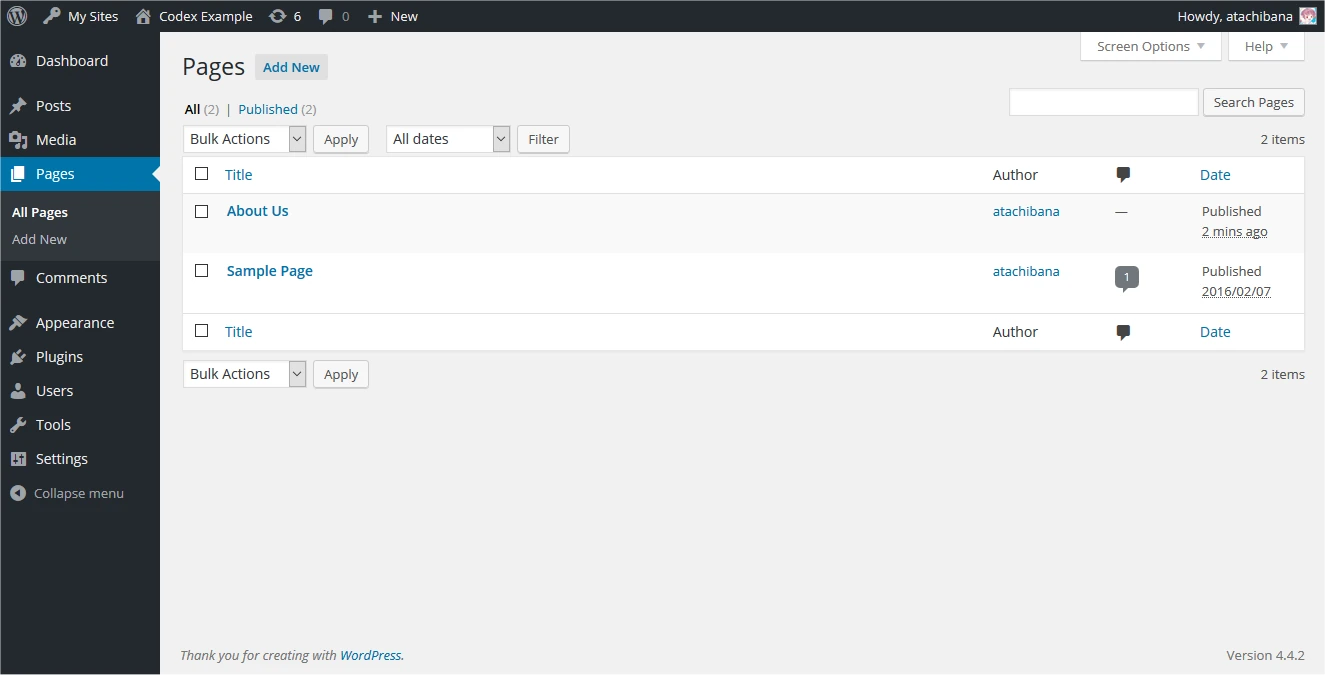
The WordPress Pages screen handles website pages. Mailbox or hosting account tasks belong in the appropriate hosting tools instead. Publisher demonstration content is shown.
Publisher’s guide — opens in a new tab ↗When HOST is a sensible fit
HOST can suit someone comfortable installing and configuring a website, a developer maintaining their own projects, or a business owner choosing SiteJet for a straightforward visual site. You do not need to choose WordPress simply because it is widely used. A manageable tool that meets your requirements is often the practical choice.
If you intend to host multiple websites, estimate their combined storage and activity. They share the cPanel account's resources and remain subject to fair use. This arrangement is not reseller hosting and does not provide WHM or a separate cPanel account for every website. Consider access and isolation needs before placing unrelated customer projects together.
A developer may value control over the initial installation. A first-time owner may value SiteJet's builder workflow. These are different reasons for choosing the same hosting pathway, which is why a decision based on tasks and confidence is more useful than ranking tools from basic to advanced.
When BUILD is a sensible fit
BUILD suits a customer who has decided to use WordPress and would prefer the WordPress and Elementor Free starting environment prepared. It provides a clear place to begin learning the dashboard, selecting a suitable theme, creating pages and organising navigation.
That preparation still leaves important choices. You need to identify the site's purpose, write its content and decide whether any required feature needs another plugin. A booking system, specialised form or membership feature should be investigated before committing to a design that depends on it.
The WordPress creation guide explains the next steps. Allow time to practise editing on a draft page and review the result on a phone. A prepared installation helps you start; a useful finished site comes from the content and testing that follow.
Understand Elementor Free before planning features
Elementor Free supports visual editing with its available widgets and controls. It does not include every paid Elementor feature. In particular, do not assume that a paid Theme Builder, Form Builder or WooCommerce Builder is supplied as part of BUILD. Check the official Free and Pro comparison against the specific feature you intend to use.
You can build useful pages with free tools, but a tutorial using a paid widget may not match your installation. If a feature requires a separate plugin or licence, account for its price, renewal and maintenance. Avoid choosing an elaborate demo design before checking which parts are included and which are paid additions.

WH4SA’s monthly pathways differ in the starting environment. Domains and separately selected software or services can add costs.
Consider SiteJet or a shop-specific starting point
SiteJet provides another DIY route through HOST. It can be a good fit for customers who want to choose a template and edit a business website visually without maintaining a WordPress theme-and-plugin setup. Compare the website builder pathway with WordPress based on your actual pages and future requirements.
If you need an e-commerce shop, SELL / E-COMMERCE at R149/month prepares WordPress, WooCommerce and Elementor Free. You create and operate the shop, including products, payment arrangements and shipping configuration. That is a different requirement from a brochure website, so assess the e-commerce pathway and the separate costs of running a shop.
Make a decision you can maintain
- Write down the pages and features you need at launch.
- Decide whether you specifically need WordPress or prefer a simpler builder workflow.
- Identify who will create the content and configure the software.
- Check whether required features use free or paid components.
- Assign responsibility for updates, backups and regular testing.
- Compare the total ongoing commitment, including domains and any third-party services.
If you are still unsure, describe the website you want and the tasks you feel comfortable doing. That gives support a practical basis for discussing the appropriate hosting starting point. The best fit is the option whose tools and responsibilities you understand well enough to use consistently.