
An online shop combines a website with business processes: a catalogue, payment collection, delivery, customer communication and records of orders. WooCommerce supplies shop software inside WordPress, but you still need to decide how your business will use it.
WH4SA's SELL / E-COMMERCE package provides WordPress, WooCommerce and Elementor Free prepared as your starting environment for R149/month. You build the shop, add products, configure the chosen integrations and operate the business. Hosting preparation is not merchant approval, a courier contract or day-to-day shop management.
Plan a small, complete first catalogue
Choose the products you can describe, price and fulfil reliably. A small catalogue with accurate stock and delivery information is more useful than a large collection of unfinished listings. For each product, gather its name, description, price, images, stock rules and physical shipping requirements where relevant.
Write down who handles orders, packing, customer questions and changes to prices. Decide which regions you can serve and how you will deal with products that are temporarily unavailable. These decisions shape the settings you need; they should not be left until someone places the first order.

A South African homeware seller needs product information, suitable packaging and a delivery process as well as a website. AI-generated business illustration; not a customer or a courier endorsement.
Connect the domain and prepared hosting
Use a domain that fits your business identity and is easy to put on packaging and email. Check domain registration options if you need a new name. Keep account access and renewal information under the business's control.
Review the SELL / E-COMMERCE hosting details and confirm the prepared environment is ready before customising it. If you are replacing an existing shop, plan the migration separately, including customer and order data. Do not point a live business domain at an unfinished shop without considering email and the current site's visitors.

A South African shop connects product selection, a separately configured payment service and a delivery workflow. R350 is an example product price, not a service charge.
Understand WordPress, WooCommerce and Elementor
WordPress manages the broader website. WooCommerce adds products, cart, checkout, customer accounts and order administration. Elementor Free can help you design ordinary content pages, such as About or a brand introduction.
Elementor Free is not Elementor Pro's WooCommerce template builder. Do not expect every product, cart or checkout design shown in a paid tutorial to be available. Start with compatible theme and WooCommerce features, then assess any separate paid requirement. The WordPress pathway explains the underlying prepared environment; SELL / E-COMMERCE adds the shop software.
Configure the shop's essential pages
Check the pages WooCommerce uses for the shop, cart, checkout and account area. Make sure each points to the intended page and that navigation does not lead to unfinished alternatives. The checkout should collect the details your actual payment and delivery workflow needs.
Add clear Contact, delivery and business policy information appropriate to your operation. Do not copy another shop's policies without checking whether they describe what you actually do. Review display currency and any tax requirements with the appropriate adviser rather than guessing settings from someone else's shop.
Create product listings that answer buying questions
Give each product a specific title and explain what the customer receives. Include dimensions, materials, compatibility or contents where these affect the decision. Separate selectable variations, such as size or colour, from general descriptive text so the order captures the customer's choice correctly.
Use images you have permission to publish. Show important details and keep image sizes appropriate for the page. Check whether the correct image, price and stock state appear when a variation changes. Enter weight and package dimensions if your selected shipping method uses them; inaccurate inputs can produce unsuitable delivery estimates.
Price the whole order, not just the item
Review the product price together with delivery, payment-provider charges and any separately purchased tools. The hosting fee is only one part of running a shop. Make sure the customer can understand the total before confirming an order.
Test discounted products, coupons and quantity changes if you enable them. Check out-of-stock behaviour and confirm that customers cannot purchase an option you cannot fulfil. Keep a record of which person may change prices so an accidental edit does not become a live offer unnoticed.
Set delivery zones and methods deliberately
WooCommerce shipping zones determine which methods customers see for an address. Specific areas should be considered before broader ones so the intended match is used. A collection option, a flat delivery charge and a courier calculation are different methods with different setup requirements. Follow the official shipping-zone documentation.
If you use a South African courier or aggregator integration, check its current compatibility, account requirements and supported services. Do not assume a locker option and door delivery behave identically. Test addresses in different provinces, an address outside your service area and a basket with unusual weight or dimensions. If no shipping method is available, treat that as an error to resolve rather than silently offering free shipping.

South African delivery options can include courier delivery and services such as pudo or other supported pickup networks. Accounts, integration support and charges must be confirmed separately.
Choose a payment gateway separately
South African options you may investigate include PayFast, Yoco, Peach Payments, Ozow, Paystack and PayGate. Compare the actual payment methods, merchant eligibility, settlement arrangements, fees and supported WooCommerce integration for your business. These providers are not all included with WH4SA hosting.
You contract with and configure the selected gateway separately. Use the provider's current instructions and keep credentials private. Sandbox credentials and live credentials have different purposes. A gateway appearing on the checkout screen does not prove that it can complete a payment or update the order correctly.
Test checkout from the customer's side
Use a safe test environment or the gateway's documented test mode where available. Test successful, declined and interrupted payment paths, then confirm the resulting order state. A payment confirmation screen, an email and the payment provider's transaction record should be considered together.
- Add products and variations from a logged-out browser.
- Try delivery addresses in and outside the configured zones.
- Check discounts, shipping and the final total.
- Confirm stock changes and order notifications.
- Check the customer's account and order information where enabled.
- Confirm that test settings are not accidentally left active at launch.
WooCommerce notes that test orders can affect emails and analytics, so use a deliberate test process. Its testing-orders guidance explains the distinction. Do not treat an uncontrolled live payment as the first test of the shop.
Manage orders, customers and communication
Use the order list and individual order details to review what was purchased, the address, payment state and fulfilment progress. Do not mark an order paid simply because someone sends a screenshot of a payment. Reconcile against the gateway or payment method your business uses.
Use business email for customer correspondence and decide who monitors it. Shipping tracking and invoice generation depend on the tools you select; confirm whether a separate integration is needed. Learn the WooCommerce order workflow before the shop starts receiving real purchases.
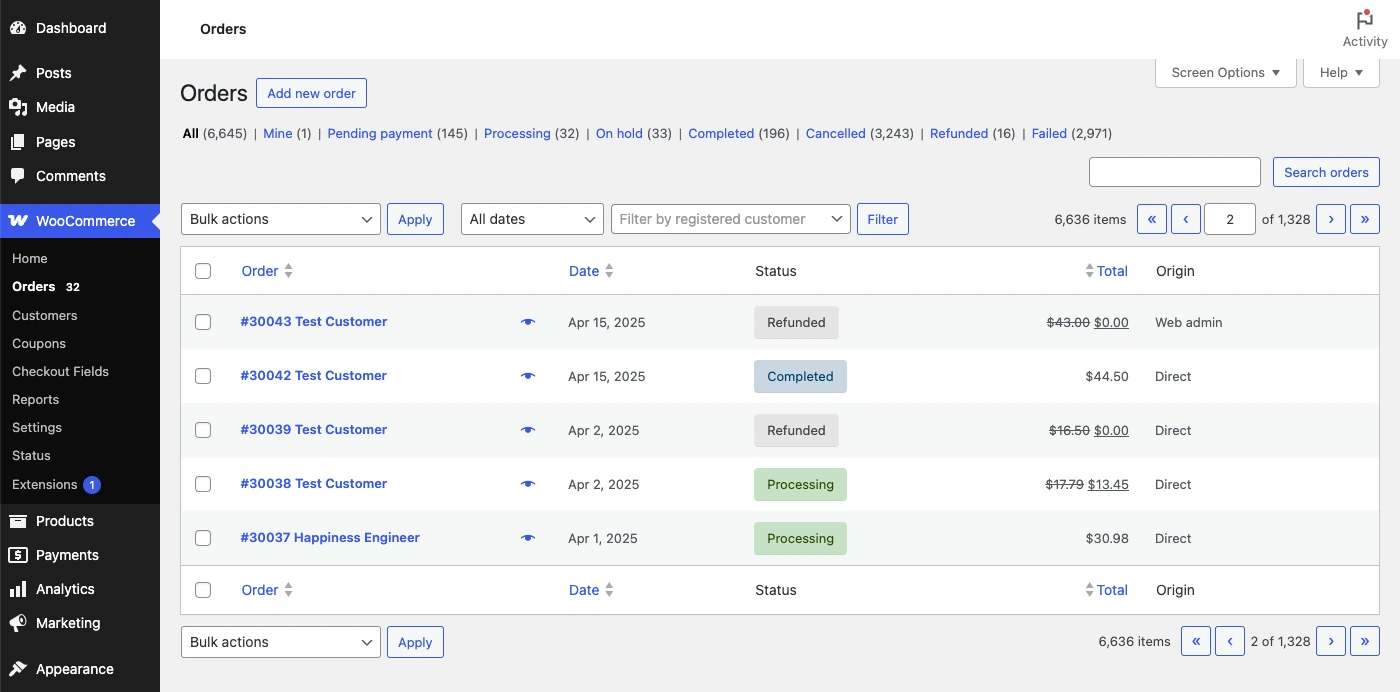
Review products, totals and order status before fulfilment. The publisher screenshot contains demonstration records and dollar amounts; your South African shop should use its configured currency, such as ZAR.
Publisher’s guide — opens in a new tab ↗Maintain a shop that keeps working
Keep WordPress, WooCommerce, the theme and plugins updated with a recovery plan. Back up files and the database, and test important flows after changes. A busy shop's orders can change between a backup and a restore, so plan carefully before rolling back data.
Schedule checks for product accuracy, stock, checkout, forms and notifications. Keep access limited to the people who need it. The ongoing work is yours: WH4SA provides the hosting and prepared starting point, while your business remains responsible for operating the e-commerce shop.