
A customer asks for a quote while you are away from your desk. You have an internet connection and a browser, but your usual email application is on another computer. Webmail gives you another way to open your business inbox and reply using your business address.
For a South African repair service, consultant or online shop, that could mean keeping enquiries under an address such as hello@yourbusiness.co.za. The address is an example, not an available domain or a working login. Here is how the pieces fit together and what to check before using them.
What is webmail?
Webmail is an email interface that runs in your web browser. You sign in to a mailbox, read messages, write replies and organise your mail without first installing a desktop email application. Your email hosting service stores and handles the messages; webmail is one way of working with them.
Think of a mailbox as the place your business correspondence arrives, and webmail as a window into it. Closing the browser does not close your email address. Customers can still send messages while you are offline, provided the email service and domain are working.
Roundcube is one example of webmail software. It provides familiar email controls, including an inbox, folders and a message composer. The screenshots in this guide are publisher examples that you can enlarge. They show the software, rather than a WH4SA customer's messages or the exact appearance of every hosting account.
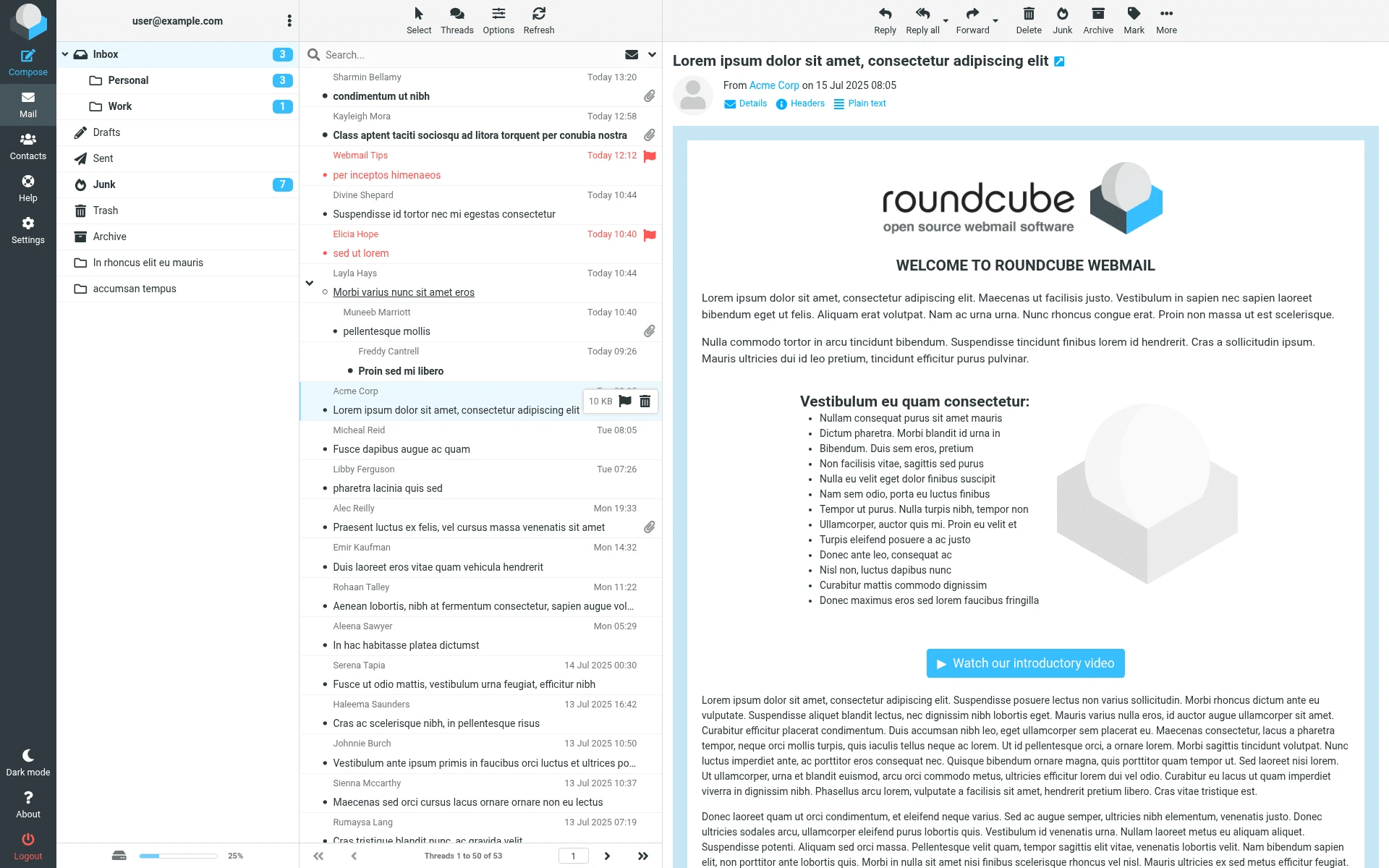
Folders are on the left, messages in the middle and the selected email on the right. This official Roundcube example contains demonstration messages. cPanel-hosted webmail can use Roundcube; account appearance and enabled tools may differ.
Publisher’s guide — opens in a new tab ↗How does business email work?
When someone emails your business, their mail service looks up where your domain receives email and attempts delivery to that service. Once accepted into your mailbox, the message can be viewed through a supported webmail interface or connected email application.
Replying sends a message through your email provider's outgoing service. A working inbox alone does not prove that every outgoing message will reach every recipient. Addresses, authentication, recipient systems and message content can all affect delivery. Test both directions when setting up a new account.
Your website and email use the same domain name if you choose, but they are separate services. Moving the website does not automatically move old messages. Changing domain settings without preserving the mail configuration can interrupt email, even when the website still opens normally.
What does a business email address look like?
An address such as info@yourbusiness.co.za has a mailbox name before the @ sign and your domain after it. A named address can identify a person, while a role address such as sales@yourbusiness.co.za describes a job within the business.
Choose addresses people can read, spell and recognise on a quote or invoice. A sole trader might start with one clearly monitored enquiry address. A growing business can plan who handles sales and accounts separately, subject to its hosting arrangement. Creating more addresses is only helpful if someone actually monitors them.
Registering a domain does not, by itself, create a working mailbox. You also need an email service and the correct connection between them. Explore domain registration options if you need a name, and business email hosting in South Africa for the email side of the setup.

A .co.za address can identify your South African business, whether you read it in a browser or a supported email app. Example address only.
Webmail, Gmail and Outlook: what is the difference?
These terms describe different things. Webmail is an access method. Gmail can refer to Google's email service or its interface. Outlook and Apple Mail are applications that can connect to supported accounts; their features and connection requirements depend on the version and service.
Scroll sideways to see all columns.
| Choice | What it means | Useful question to ask |
|---|---|---|
| Personal Gmail address | An address ending in gmail.com, on Google's service | Is this the identity you want customers to see? |
| Own-domain business email | An address using a domain your business controls | Which provider hosts this mailbox? |
| Webmail | Access to an email account through a browser | What is the approved sign-in address? |
| Desktop or phone mail app | Software connected to your supported mailbox | What secure connection settings does it require? |
An own-domain address is not exclusive to cPanel. For example, Google Workspace also supports custom business email. Choosing a provider and choosing how you read messages are separate decisions. A familiar application does not necessarily mean your email is hosted by that application's maker.
For everyday work, webmail can be convenient on a trusted spare computer, while a mail app may suit someone who wants notifications and multiple accounts in one place. You do not normally need to choose one access method forever. Check that your account and selected software support the combination you want.
How cPanel and webmail work together
cPanel is a hosting control panel. Its email tools allow authorised users to manage mailboxes. Webmail is where a mailbox user reads and sends correspondence. This distinction matters: someone who only needs an inbox should not automatically receive the main hosting login.
In cPanel's documented workflow, open Email Accounts, locate the intended mailbox and select Check Email. The webmail area then provides access to the inbox. A Roundcube inbox may open directly if that preference has been set. The current cPanel webmail documentation describes this route and notes that some tools depend on the provider's configuration.
Use the mailbox you intend to represent before replying to a customer. An accounts enquiry should not accidentally receive a response from an unrelated test address. If you manage several domains, check the full address rather than relying only on the name before the @ sign.
WH4SA's cPanel hosting guide explains the wider control panel. Available email settings, storage allocations and software can depend on your service. cPanel and Roundcube are third-party products; WH4SA does not own those applications.

The Email Accounts screen has Check Email beside the account row. This cPanel documentation image also highlights Create. The system account and displayed allocations are publisher examples, not WH4SA mailbox limits or customer records.
Publisher’s guide — opens in a new tab ↗How do I open my inbox safely?
Start with the webmail address provided for your hosting account, or the verified cPanel route above. Bookmark the correct address after confirming it. A link in an unexpected “mailbox full” message is not a reliable starting point, even if its logo looks familiar.
For direct mailbox login, use the full email address and that mailbox's password when requested. The domain-registration account, website editor, main hosting account and individual mailbox are different access points; their passwords should not be assumed to be interchangeable.
If the sign-in page shows a certificate warning, stop and confirm the address with support. Do not bypass the warning to enter credentials. If login fails, check the address and keyboard settings before repeatedly trying passwords. Keep any error message for support, but never send your password in an enquiry.
Account-specific addresses and detailed recovery steps belong in the WH4SA Knowledge Base or customer support environment. This article explains the general route; it does not supply a universal WH4SA webmail login URL.
Can I use business email on my phone?
Yes, where your mailbox and chosen app support the connection. You can use a supported mobile browser or add the account to a compatible mail application. Follow the settings supplied for the account, including incoming and outgoing server names, authentication and secure connection options.
IMAP is commonly used to synchronise server-based mail folders across devices. POP works differently and can download messages according to the app's retention settings. Do not switch protocols or delete an old configuration until you understand where existing messages are stored. cPanel's email account connection guide links to device setup instructions.
After setup, test receiving and replying from the phone, then look for the sent message in webmail. If folders differ between devices, investigate their configuration before deleting anything. Lock your phone and keep its software updated, particularly when it contains customer correspondence.
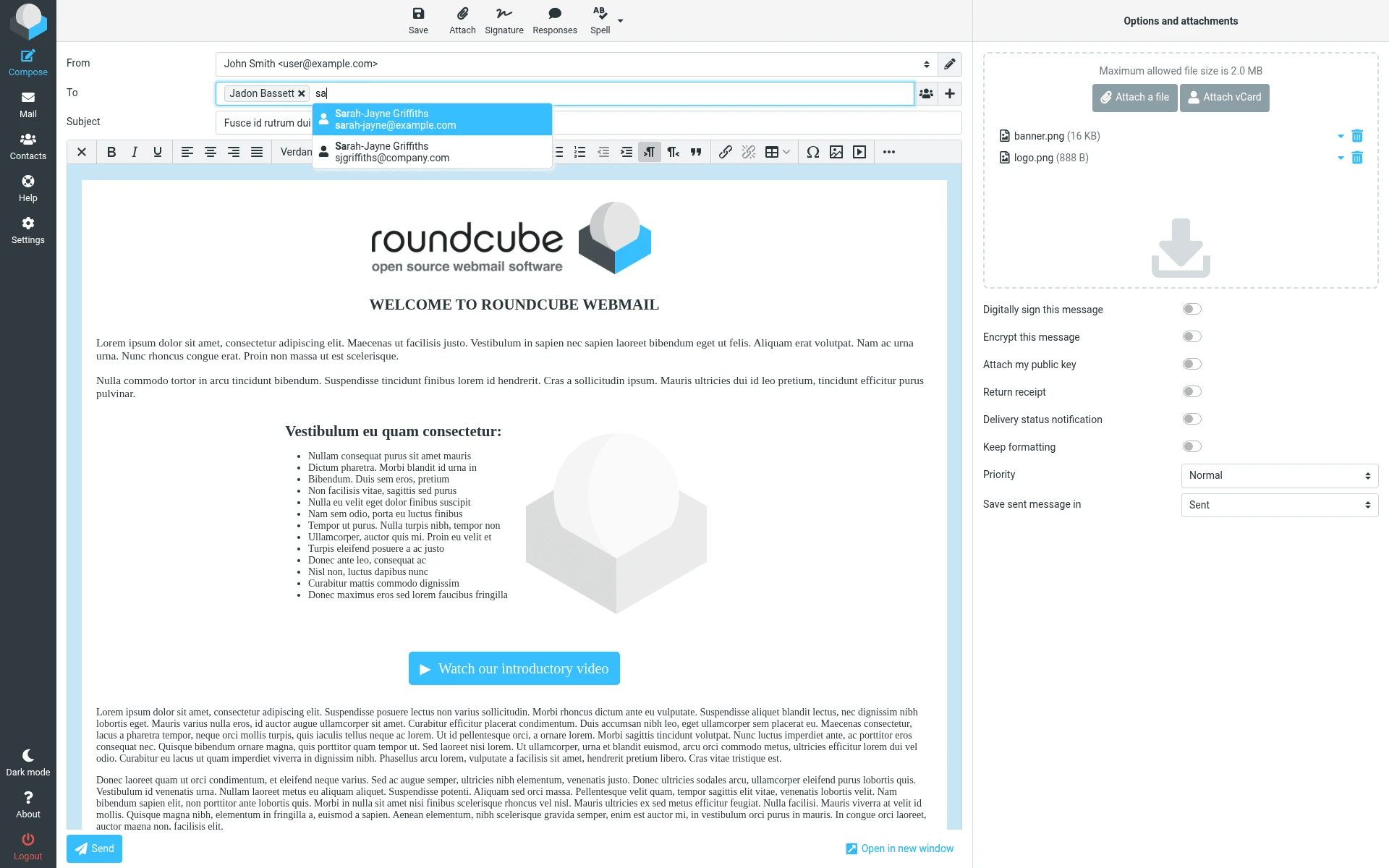
The composer brings together the sender, recipients, subject, message and attachments. Before sending a customer quote, check the address and attached file. Official Roundcube demonstration: sample limits, plugins and options are not WH4SA plan specifications.
Publisher’s guide — opens in a new tab ↗Basic security for a business inbox
Use a unique, strong mailbox password and a reputable password manager. Enable multi-factor authentication wherever the service makes it available. Keep the browser and mail application updated, and sign out when finished on a shared device. Avoid saving business credentials on someone else's computer.
Treat requests to change supplier bank details with extra care. A familiar display name or a correct-looking signature is not proof that a message is genuine. Verify sensitive changes through a contact number you already trust, rather than the number supplied in the suspicious email. CISA's Secure Our World guidance covers phishing, passwords, updates and multi-factor authentication.
Decide who may access each mailbox and review access when staff leave. Keep recovery details current. Do not assume that being able to see a message on two devices means you have an independent backup: synchronised deletion can affect both views. Confirm the available recovery arrangements before relying on them.
Frequently asked questions
Do I need a finished website before using email?
No. A domain and correctly configured email service can work before your website is ready. Keep the domain renewed and record who manages its settings, because an unfinished website does not remove those responsibilities.
Does using webmail change my address?
No. Opening a supported mailbox through webmail changes how you access it. It does not automatically replace your own-domain address with a Roundcube or cPanel address.
Can I use webmail and a mail app together?
Often, yes. Confirm compatibility and use the supplied settings. Test how Inbox, Sent and deleted messages behave across your devices rather than assuming every folder will match immediately.
Is webmail included with my hosting?
Check the specific service and enabled tools. WH4SA offers domain-based email in the appropriate hosting environment; HOST web hosting provides a starting point for websites and professional email. Confirm any account-specific requirements with support before moving an existing business inbox.